> ## Documentation Index
> Fetch the complete documentation index at: https://docs.shortext.ny-corp.io/llms.txt
> Use this file to discover all available pages before exploring further.
# Send Message
> Envoie un message au destinataire via l'API Shortext
Text messages are messages containing only a text body and an optional link preview.
## Link Preview
You can have the WhatsApp client attempt to render a preview of the first URL in the body text string, if it
contains one. URLs must begin with http\:// or https\://. If multiple URLs are in the body text string, only the
first URL will be rendered.
If omitted, or if unable to retrieve a link preview, a clickable link will be rendered instead.
Interactive reply buttons messages allow you to send up to three predefined replies for users to choose from.
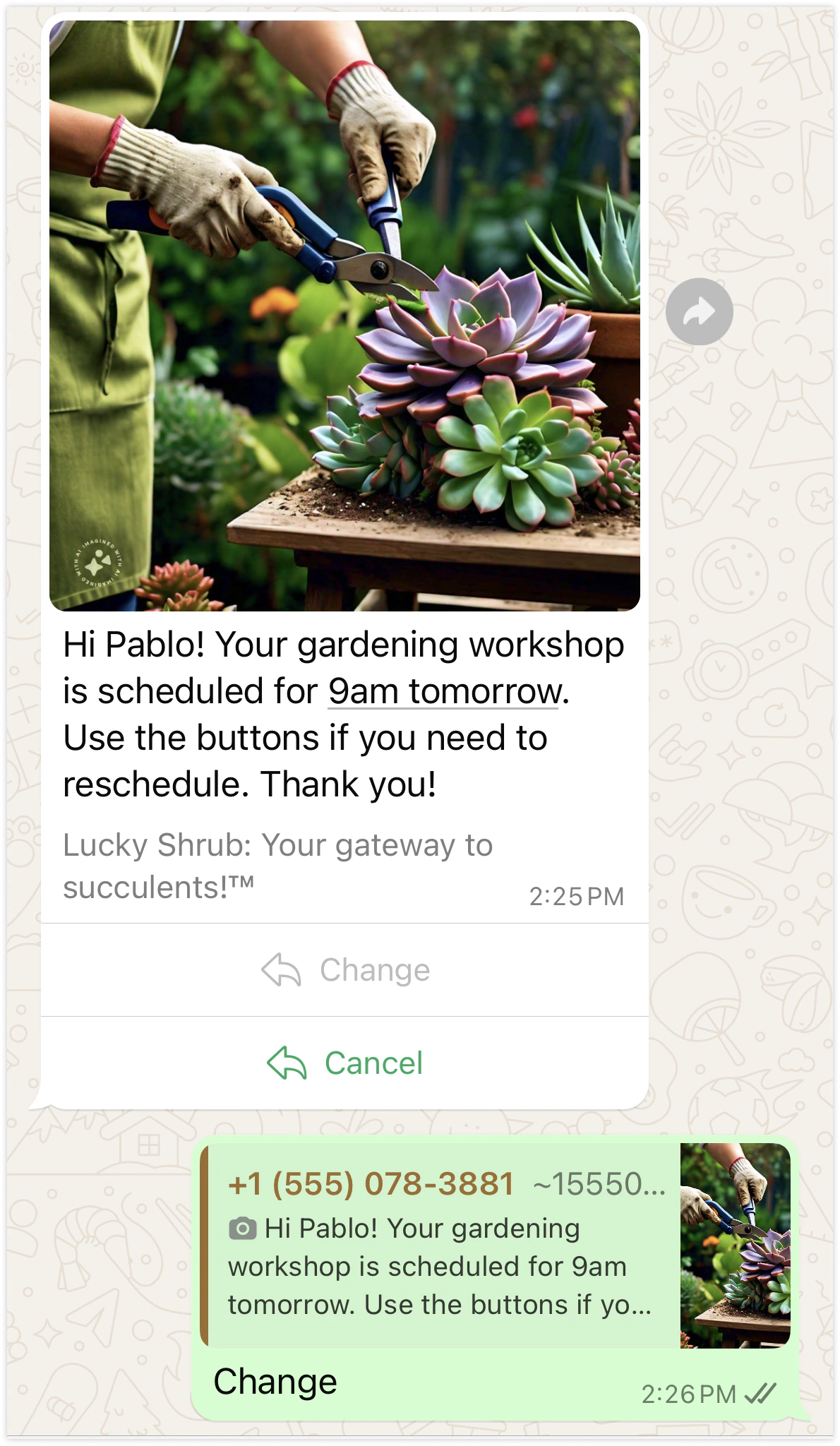
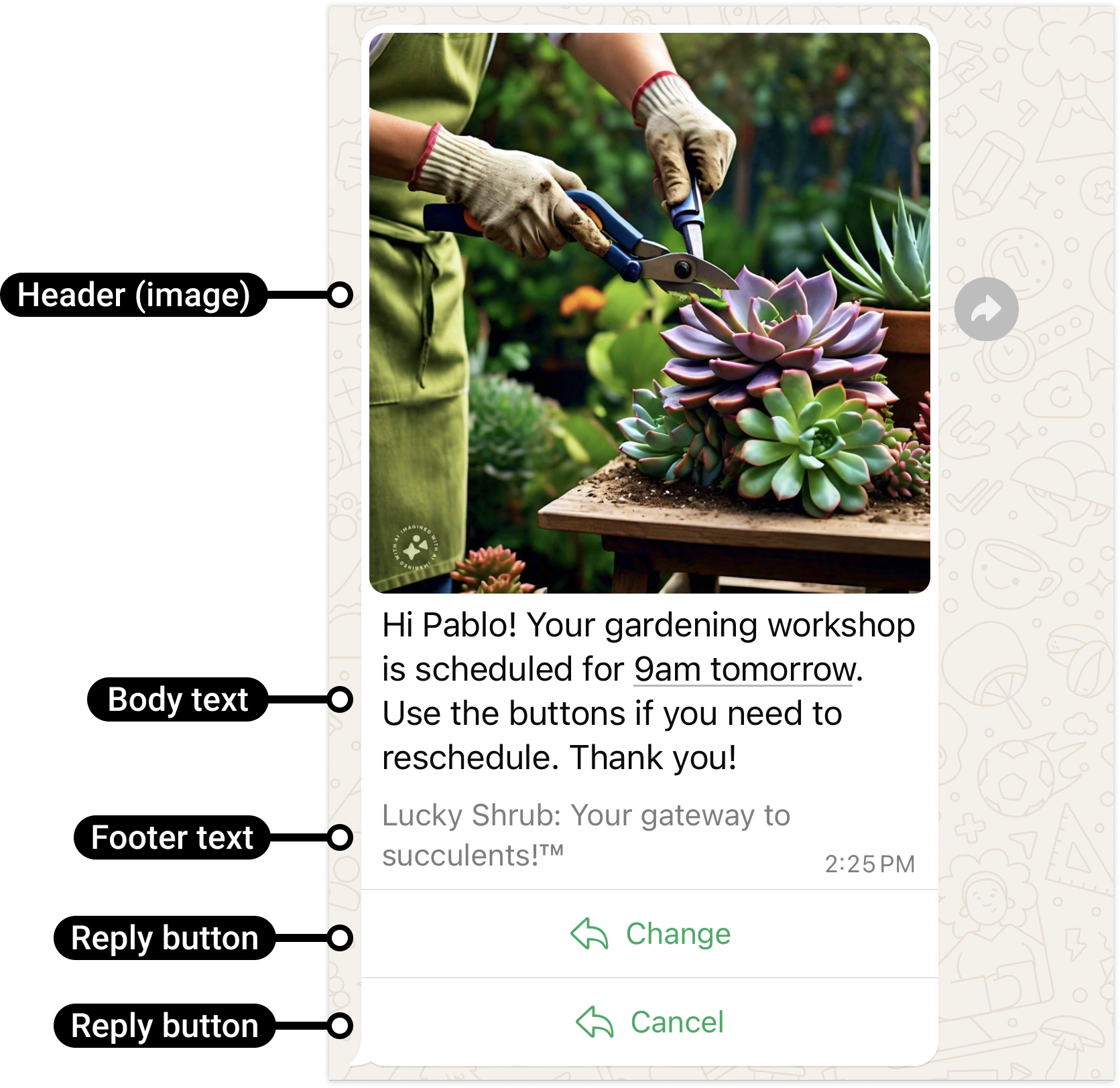 Users can respond to a message by selecting one of the predefined buttons, which triggers a messages webhook describing their selection.
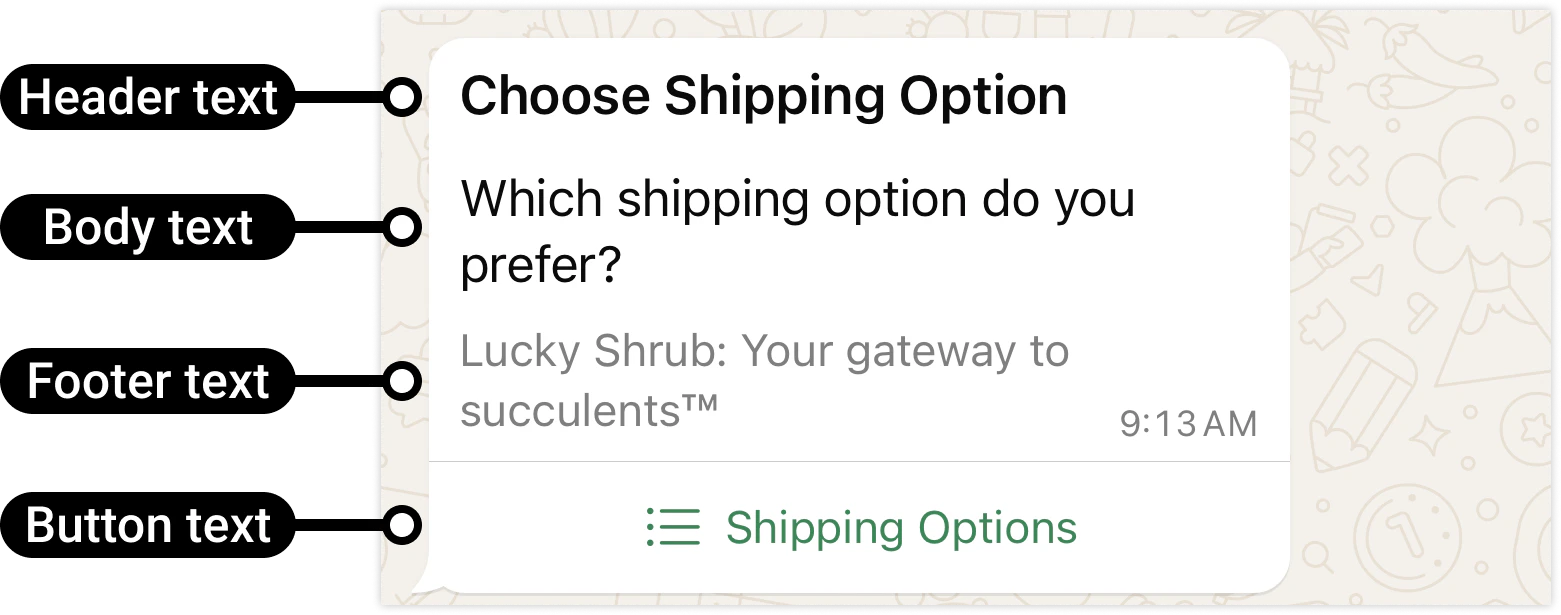
 Interactive list messages allow you to present WhatsApp users with a list of options to choose from (options are defined as rows in the request payload):
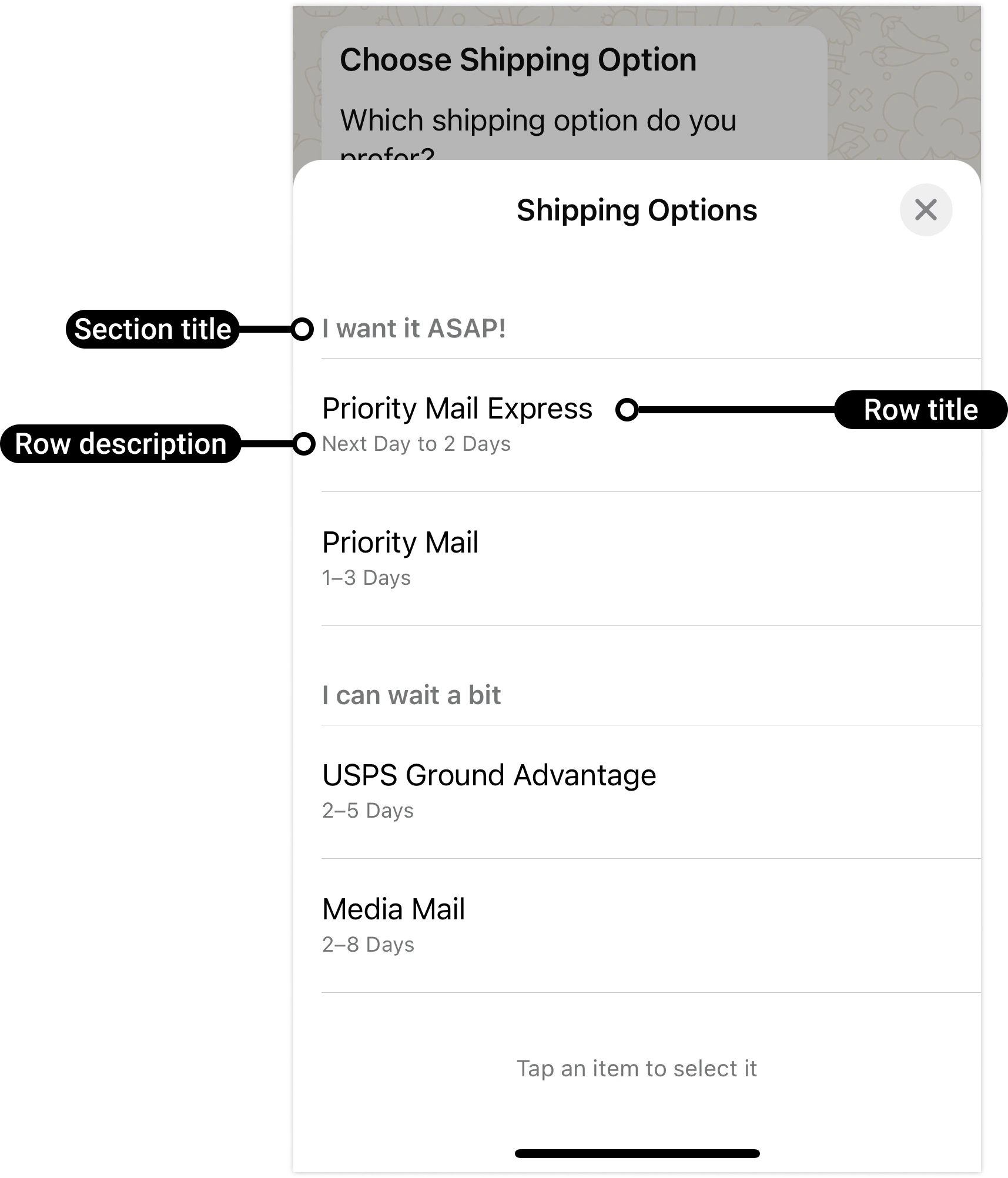
 When a user taps the button in the message, it displays a modal that lists the options available:
 Users can then choose one option and their selection will be sent as a reply:
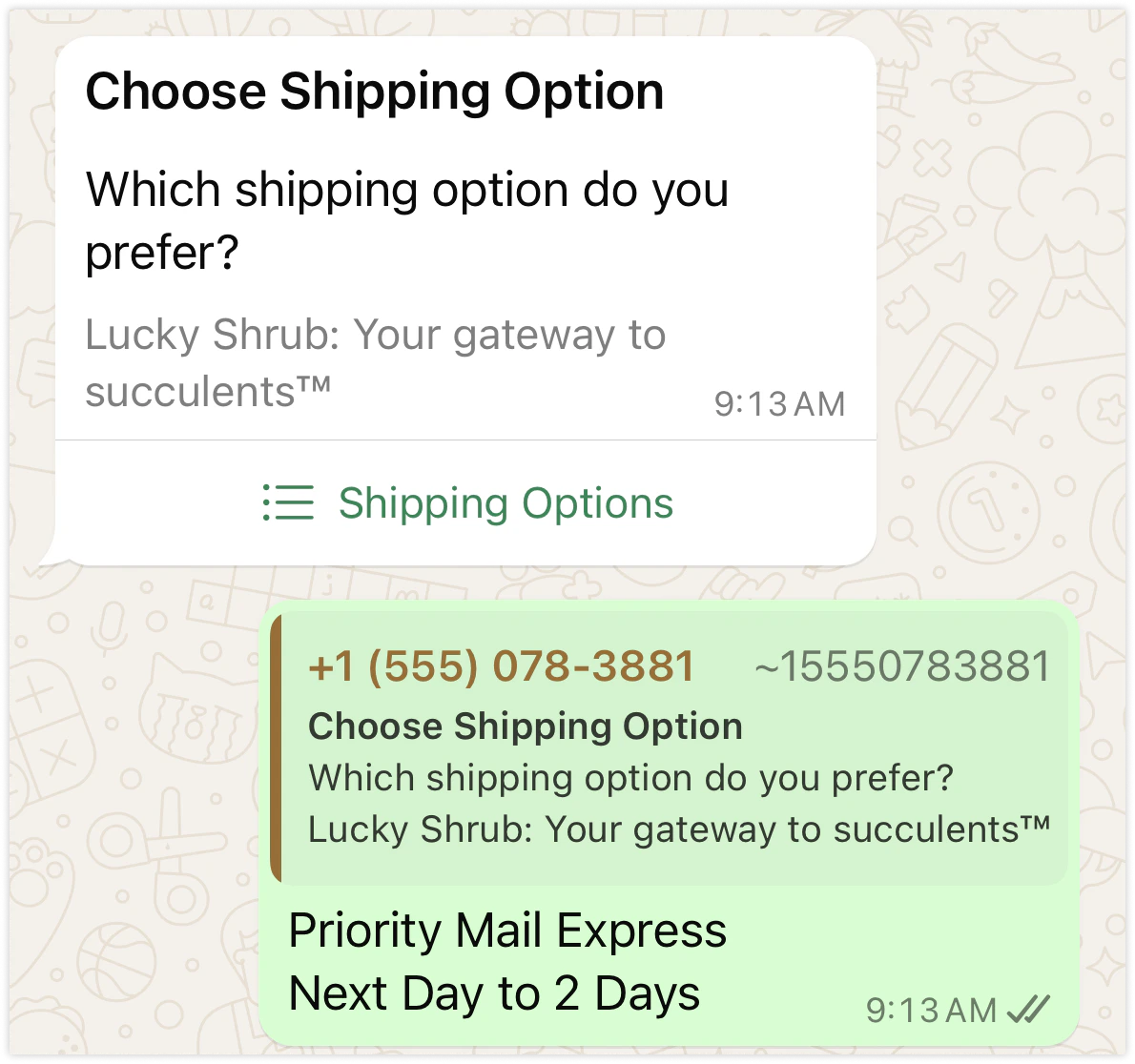 Interactive list messages support up to 10 sections, with up to 10 rows per section, and can include an optional header and footer.
💪 Here's content that's only inside the third Tab.
💪 Here's content that's only inside the third Tab.
## OpenAPI
````yaml POST /messages/send
openapi: 3.1.0
info:
title: Shortext API
description: This is my API
version: '1.0'
servers:
- url: https://shortext.ny-corp.io/api
- url: https://whatsapp-gateway.test/api
security: []
tags:
- name: Agents
description: Agents
- name: Business - Manager
description: Business - Manager
- name: Messages
description: Messages
- name: Tickets
description: Tickets
- name: health
description: health
paths:
/messages/send:
post:
tags:
- Messages
summary: Send a message
description: Envoie un message au destinataire via l'API Shortext
operationId: sendMessage
requestBody:
required: true
content:
application/json:
schema:
$ref: '#/components/schemas/SendMessageRequest'
responses:
'200':
description: ButtonReplyMessage sent successfully
content:
application/json:
schema:
$ref: '#/components/schemas/SendMessageResponse'
security:
- bearerAuth: []
components:
schemas:
SendMessageRequest:
required:
- channel
- contact
- from
- message
properties:
channel:
type: string
enum:
- whatsapp
contact:
required:
- phone
- profile
properties:
phone:
description: For channel whatsapp -> E.164 format without leading +
type: string
example: '1234567890'
profile:
required:
- lastname
properties:
lastname:
type: string
example: Yoan
firstname:
type: string
example: André
email:
type: string
example: celia@home.io
address:
type: string
example: Place to be
preferred_language:
type: string
enum:
- en
- fr
example: en
type: object
type: object
from:
description: the id of the sender business number
type: string
example: '1234567890'
message:
properties:
type:
type: string
enum:
- text
- media
- interactive
- template
example: text
content:
oneOf:
- $ref: '#/components/schemas/TextMessageContent'
- $ref: '#/components/schemas/ImageMessageContent'
- $ref: '#/components/schemas/VideoMessageContent'
- $ref: '#/components/schemas/DocumentMessageContent'
- $ref: '#/components/schemas/AudioMessageContent'
- $ref: '#/components/schemas/InteractiveButtonMessageContent'
type: object
type: object
SendMessageResponse:
properties:
success:
type: boolean
example: 'true'
message_id:
type: string
example: abc123
recipient:
properties:
phone_number:
type: string
example: '1234567890'
type: object
data:
properties:
sent_at:
type: string
format: date-time
example: '2024-10-05T10:01:00Z'
delivered_at:
type: string
format: date-time
example: '2024-10-05T10:05:00Z'
read_at:
type: string
format: date-time
example: '2024-10-05T10:07:00Z'
type: object
type: object
TextMessageContent:
title: Text Message
description: >-
WhatsApp allow text message only when there is already an open session
between the contact and the business number
required:
- text
properties:
text:
description: 'for embedded url please use this format ex: https://shortext.io'
type: string
maxLength: 4096
example: Ceci est un message texte.
preview_url:
type: boolean
default: true
example: true
type: object
ImageMessageContent:
title: Image Message
description: >-
Image messages are messages that display a single image and an optional
caption.
required:
- media_type
- media_url
properties:
media_type:
description: Get the validation rules that apply to the request.
type: string
enum:
- image
example: image
media_url:
type: string
example: https://example.com/image.jpg
caption:
type: string
maxLength: 1024
example: Voici une image
type: object
VideoMessageContent:
title: Video Message
description: >-
Video messages display a thumbnail preview of a video image with an
optional caption. When the WhatsApp user taps the preview, it loads the
video and displays it to the user.
required:
- media_type
- media_url
properties:
media_type:
type: string
enum:
- video
example: video
media_url:
type: string
example: https://example.com/video.mp4
caption:
type: string
maxLength: 1024
example: Voici une image
type: object
DocumentMessageContent:
title: Document Message
description: >-
Document messages are messages that display a document icon, linked to a
document, that a WhatsApp user can tap to download.
required:
- media_type
- media_url
properties:
media_type:
type: string
enum:
- document
example: document
media_url:
type: string
example: https://example.com/document.pdf
name:
description: >-
Document filename, with extension. The WhatsApp client will use an
appropriate file type icon based on the extension.
type: string
maxLength: 30
example: Facture.pdf
caption:
type: string
maxLength: 1024
example: Voici une image
type: object
AudioMessageContent:
title: Audio Message
description: >-
Audio messages display an audio icon and a link to an audio file. When
the WhatsApp user taps the icon, the WhatsApp client loads and plays the
audio file.
required:
- media_type
- media_url
properties:
media_type:
description: Get the validation rules that apply to the request.
type: string
enum:
- audio
example: audio
media_url:
type: string
example: https://example.com/image.jpg
type: object
InteractiveButtonMessageContent:
title: Interactive Button Reply Message
properties:
type:
description: Get the validation rules that apply to the request.
type: string
enum:
- button
- payment
example: button
header:
description: >-
Text header doesn't allow formating like ** or any other
format supported by WhatsApp
properties:
type:
type: string
enum:
- text
- image
- video
- document
example: text
text:
type: string
example: Sélectionnez une option
type:
- object
- 'null'
body:
properties:
text:
type: string
example: Voici deux options
type: object
footer:
properties:
text:
type: string
example: Sélectionnez une option
type:
- string
- 'null'
buttons:
type: array
items:
properties:
id:
type: string
example: btn_1
title:
type: string
example: Option 1
type: object
payment_detail:
type: array
items:
properties:
amount:
type: number
format: float
example: '100'
currency:
type: string
example: XAF
order_id:
type: string
example: ORDER001
callback_url:
type: string
example: https://shortext.ny-corp.io/callback
type: object
action:
type: array
items:
properties:
url:
type: string
example: https://shortext.ny-corp.io
type: object
type: object
securitySchemes:
bearerAuth:
type: http
description: Basic Auth
scheme: bearer
````
Interactive list messages support up to 10 sections, with up to 10 rows per section, and can include an optional header and footer.
💪 Here's content that's only inside the third Tab.
💪 Here's content that's only inside the third Tab.
## OpenAPI
````yaml POST /messages/send
openapi: 3.1.0
info:
title: Shortext API
description: This is my API
version: '1.0'
servers:
- url: https://shortext.ny-corp.io/api
- url: https://whatsapp-gateway.test/api
security: []
tags:
- name: Agents
description: Agents
- name: Business - Manager
description: Business - Manager
- name: Messages
description: Messages
- name: Tickets
description: Tickets
- name: health
description: health
paths:
/messages/send:
post:
tags:
- Messages
summary: Send a message
description: Envoie un message au destinataire via l'API Shortext
operationId: sendMessage
requestBody:
required: true
content:
application/json:
schema:
$ref: '#/components/schemas/SendMessageRequest'
responses:
'200':
description: ButtonReplyMessage sent successfully
content:
application/json:
schema:
$ref: '#/components/schemas/SendMessageResponse'
security:
- bearerAuth: []
components:
schemas:
SendMessageRequest:
required:
- channel
- contact
- from
- message
properties:
channel:
type: string
enum:
- whatsapp
contact:
required:
- phone
- profile
properties:
phone:
description: For channel whatsapp -> E.164 format without leading +
type: string
example: '1234567890'
profile:
required:
- lastname
properties:
lastname:
type: string
example: Yoan
firstname:
type: string
example: André
email:
type: string
example: celia@home.io
address:
type: string
example: Place to be
preferred_language:
type: string
enum:
- en
- fr
example: en
type: object
type: object
from:
description: the id of the sender business number
type: string
example: '1234567890'
message:
properties:
type:
type: string
enum:
- text
- media
- interactive
- template
example: text
content:
oneOf:
- $ref: '#/components/schemas/TextMessageContent'
- $ref: '#/components/schemas/ImageMessageContent'
- $ref: '#/components/schemas/VideoMessageContent'
- $ref: '#/components/schemas/DocumentMessageContent'
- $ref: '#/components/schemas/AudioMessageContent'
- $ref: '#/components/schemas/InteractiveButtonMessageContent'
type: object
type: object
SendMessageResponse:
properties:
success:
type: boolean
example: 'true'
message_id:
type: string
example: abc123
recipient:
properties:
phone_number:
type: string
example: '1234567890'
type: object
data:
properties:
sent_at:
type: string
format: date-time
example: '2024-10-05T10:01:00Z'
delivered_at:
type: string
format: date-time
example: '2024-10-05T10:05:00Z'
read_at:
type: string
format: date-time
example: '2024-10-05T10:07:00Z'
type: object
type: object
TextMessageContent:
title: Text Message
description: >-
WhatsApp allow text message only when there is already an open session
between the contact and the business number
required:
- text
properties:
text:
description: 'for embedded url please use this format ex: https://shortext.io'
type: string
maxLength: 4096
example: Ceci est un message texte.
preview_url:
type: boolean
default: true
example: true
type: object
ImageMessageContent:
title: Image Message
description: >-
Image messages are messages that display a single image and an optional
caption.
required:
- media_type
- media_url
properties:
media_type:
description: Get the validation rules that apply to the request.
type: string
enum:
- image
example: image
media_url:
type: string
example: https://example.com/image.jpg
caption:
type: string
maxLength: 1024
example: Voici une image
type: object
VideoMessageContent:
title: Video Message
description: >-
Video messages display a thumbnail preview of a video image with an
optional caption. When the WhatsApp user taps the preview, it loads the
video and displays it to the user.
required:
- media_type
- media_url
properties:
media_type:
type: string
enum:
- video
example: video
media_url:
type: string
example: https://example.com/video.mp4
caption:
type: string
maxLength: 1024
example: Voici une image
type: object
DocumentMessageContent:
title: Document Message
description: >-
Document messages are messages that display a document icon, linked to a
document, that a WhatsApp user can tap to download.
required:
- media_type
- media_url
properties:
media_type:
type: string
enum:
- document
example: document
media_url:
type: string
example: https://example.com/document.pdf
name:
description: >-
Document filename, with extension. The WhatsApp client will use an
appropriate file type icon based on the extension.
type: string
maxLength: 30
example: Facture.pdf
caption:
type: string
maxLength: 1024
example: Voici une image
type: object
AudioMessageContent:
title: Audio Message
description: >-
Audio messages display an audio icon and a link to an audio file. When
the WhatsApp user taps the icon, the WhatsApp client loads and plays the
audio file.
required:
- media_type
- media_url
properties:
media_type:
description: Get the validation rules that apply to the request.
type: string
enum:
- audio
example: audio
media_url:
type: string
example: https://example.com/image.jpg
type: object
InteractiveButtonMessageContent:
title: Interactive Button Reply Message
properties:
type:
description: Get the validation rules that apply to the request.
type: string
enum:
- button
- payment
example: button
header:
description: >-
Text header doesn't allow formating like ** or any other
format supported by WhatsApp
properties:
type:
type: string
enum:
- text
- image
- video
- document
example: text
text:
type: string
example: Sélectionnez une option
type:
- object
- 'null'
body:
properties:
text:
type: string
example: Voici deux options
type: object
footer:
properties:
text:
type: string
example: Sélectionnez une option
type:
- string
- 'null'
buttons:
type: array
items:
properties:
id:
type: string
example: btn_1
title:
type: string
example: Option 1
type: object
payment_detail:
type: array
items:
properties:
amount:
type: number
format: float
example: '100'
currency:
type: string
example: XAF
order_id:
type: string
example: ORDER001
callback_url:
type: string
example: https://shortext.ny-corp.io/callback
type: object
action:
type: array
items:
properties:
url:
type: string
example: https://shortext.ny-corp.io
type: object
type: object
securitySchemes:
bearerAuth:
type: http
description: Basic Auth
scheme: bearer
````